![striive_RGB_logo-01.png]](https://support.striive.com/hs-fs/hubfs/striive_RGB_logo-01.png?height=40&name=striive_RGB_logo-01.png)
On the Assignments page, you can view all the available assignments, your favorite assignments, and suggested assignments based on your profile.
Use the tabs on the left side of the page to browse different assignments categories:
- All: view all the available assignments.
- Favorites: view the assignments you have marked as favorite.
To add an assignment to Favorites:- Hover over the assignments in the All tab.
- Select
 next to the assignment you want to mark as favorite.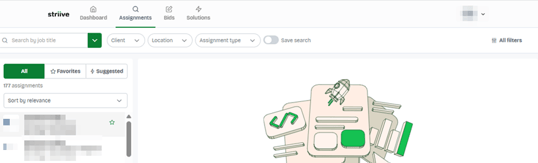
- Suggested: view the assignments recommended by the platform based on your profile information.
How to apply filters
You can use the filters at the top of the page to filter by:
- Client
- Location

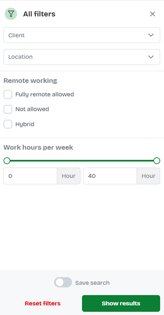
To refine your search, select  on the right side of the page. You can additionally filter assignments by:
- type of work (remote, hybrid, or on-site)
- number of working hours
Notes:
- To reset the filters, select Reset filters on the All filters page.
- To save your search preferences, select Save search.
How to search for assignments
To search for a specific assignment, enter the assignment title in the search bar at the top of the page.